
Top 10 Best Image Resizer Tools in 2026

Images are everywhere online. Websites, blogs, social media posts, and online stores all rely on images to attract visitors. The problem is that large images slow down websites and take more storage. That’s why image resizing tools are important.

An image resizer helps you change the size of an image without ruining its quality. It also helps reduce file size, making images faster to load on websites.

Here are the top 10 best image resizer tools in 2026 that people use to quickly resize images.

1. Image Resizer Tools

ImageResizer.tools is one of the most convenient image resizing tools available today. It focuses on simplicity and speed, making it ideal for users who want quick results without complicated settings.

Many online tools include too many features that can confuse beginners. ImageResizer.tools solves this problem by providing a clean interface where users can resize images in just a few steps.

You simply upload the image, choose the desired size, and download the resized version. The process takes only a few seconds.

Key Features

  • Fast image resizing

  • Simple and clean interface

  • No software installation required

  • Works directly in the browser

  • Supports common image formats

  • Maintains good image quality

Another benefit is that the tool works well on both desktop and mobile devices. This means users can resize images from anywhere without installing an app.

Who Should Use It

ImageResizer.tools is useful for:

  • Bloggers

  • Website owners

  • Graphic designers

  • Social media managers

  • Online store owners

If someone needs a quick and reliable way to resize images, this tool is one of the best choices in 2026. You can easily resize you images through Image Resizer Tools.
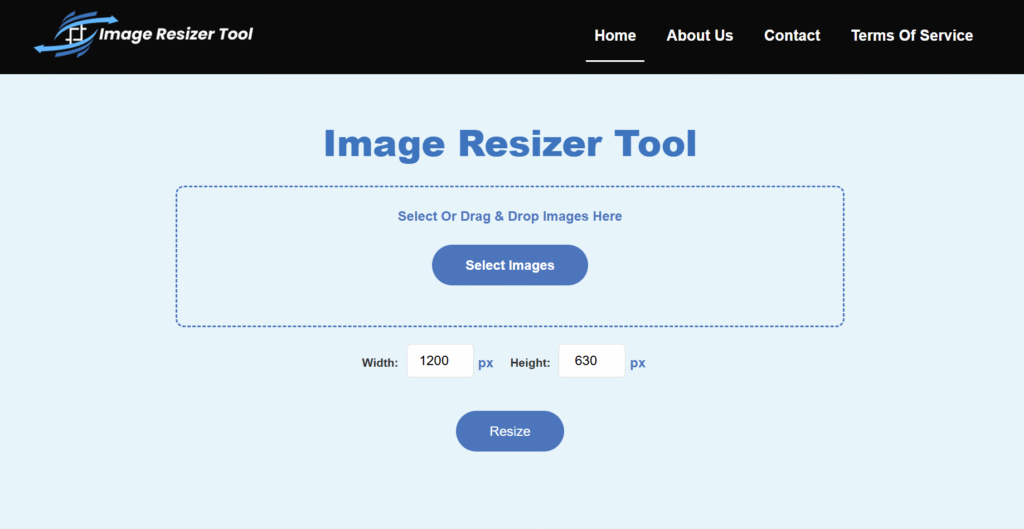
Image Resizer Tool

2. Adobe Express Image Resizer

Adobe Express is an online tool created by Adobe, the same company behind Photoshop. The platform includes many editing features, including an image resizing tool.

Adobe Express allows users to resize images for different platforms such as Instagram, Facebook, YouTube thumbnails, and website banners.

Key Features

  • High quality image processing

  • Preset sizes for social media

  • Drag and drop image upload

  • Easy export options

  • Cloud-based editing

Because Adobe has years of experience in image editing, the results are usually very accurate and high quality.

However, some advanced features may require a paid plan.

Best For

Adobe Express is best for:

  • Designers

  • Content creators

  • Marketing teams

  • Social media managers

3. Canva Image Resize Tool

Canva has become one of the most popular online design platforms. Many people use Canva for creating graphics, presentations, and social media posts.

One useful feature in Canva is its image resizing tool.

With Canva, users can upload images and quickly resize them for different platforms.

Key Features

  • Easy drag and drop interface

  • Resize images for multiple platforms

  • Built-in design tools

  • Templates and layouts available

  • Free and premium options

The Canva interface is very beginner-friendly. Even people with no design experience can use it easily.

Best For

Canva works well for:

  • Bloggers

  • Social media marketers

  • Small businesses

  • Students

4. Simple Image Resizer

Simple Image Resizer is exactly what its name suggests. It is a basic online tool designed only for resizing images.

The website is lightweight and loads very quickly. Users can resize images by entering the dimensions or choosing a percentage.

Key Features

  • Extremely simple interface

  • Resize by pixels or percentage

  • Quick processing

  • Works on all browsers

  • Free to use

Because it focuses only on resizing, it performs the task very efficiently.

Best For

Simple Image Resizer is useful for users who want a fast and straightforward resizing tool without extra editing features.

5. iLoveIMG

iLoveIMG is a well-known online platform that provides many tools related to image editing.

It allows users to resize images, compress images, convert formats, and crop photos.

Key Features

  • Resize multiple images at once

  • Compress image file size

  • Convert image formats

  • Batch processing support

  • Easy file download

Batch processing is one of the most useful features. It allows users to resize many images at the same time.

Best For

iLoveIMG is ideal for:

  • Website managers

  • Ecommerce store owners

  • Digital marketers

  • Content creators

6. PicResize

PicResize is another popular image editing and resizing tool that has been used by many people for years.

The tool offers resizing along with some basic photo editing options.

Key Features

  • Resize images quickly

  • Crop photos

  • Add effects and filters

  • Supports many file formats

  • Works online without installation

PicResize can also help users prepare images for social media or website uploads.

Best For

It works well for people who want simple editing features along with resizing.

7. ResizePixel

ResizePixel is a modern online tool designed for fast image editing. The platform includes several useful features besides resizing.

Users can control the image size precisely by entering the exact pixel dimensions.

Key Features

  • Resize images by pixels

  • Compress image files

  • Convert image formats

  • Crop images easily

  • Simple interface

The website is clean and easy to use, which makes the process simple for beginners.

Best For

ResizePixel is great for:

  • Bloggers

  • Website developers

  • Designers

  • Students

8. Fotor Image Resizer

Fotor is an online photo editing platform that includes many creative tools. It allows users to resize images along with editing and enhancing them.

Fotor also provides AI-powered features that improve image quality automatically.

Key Features

  • Smart image resizing

  • AI photo enhancement

  • Filters and effects

  • Easy export options

  • Online editing workspace

Users who want both resizing and photo editing tools may find Fotor very useful.

Best For

Fotor is best for:

  • Photographers

  • Designers

  • Content creators

9. BeFunky Image Resizer

BeFunky is another platform that combines photo editing and image resizing features.

It provides tools for editing photos, creating designs, and resizing images quickly.

Key Features

  • Fast image resizing

  • Photo enhancement tools

  • Background editing options

  • Online editing platform

  • Simple user interface

The tool is easy to use and does not require software installation.

Best For

BeFunky is good for:

  • Social media creators

  • Designers

  • Bloggers

10. Kapwing Image Resizer

Kapwing is widely known for video editing, but it also offers a strong image resizing tool.

It allows users to adjust image dimensions and prepare images for different social media platforms.

Key Features

  • Resize images for different platforms

  • Drag and drop editor

  • Cloud-based editing

  • Collaboration features

  • Easy export options

Because Kapwing works online, users can edit and resize images from any device.

Best For

Kapwing works well for:

  • Content creators

  • Marketing teams

  • Social media managers

Why Image Resizing Is Important

Many people upload images directly from their phones or cameras without resizing them. This can cause several problems.

1. Faster Website Speed

Large images slow down websites. Resizing them reduces the file size and improves page loading speed.

2. Better User Experience

Visitors prefer websites that load quickly. Optimized images help improve user experience.

3. Improved SEO

Search engines prefer fast websites. Properly resized images can help improve search engine rankings.

4. Easier Sharing

Smaller images are easier to upload, download, and share on social media platforms.

5. Saves Storage Space

Resized images take less storage space on servers and devices.

How to Choose the Right Image Resizer

Not all image resizers are the same. Some focus on speed, while others include advanced editing features.

Here are a few things to consider when choosing a tool.

1. Ease of Use

The tool should have a simple interface that anyone can use.

2. Image Quality

A good resizer should maintain image clarity after resizing.

3. Speed

The resizing process should be quick.

4. Extra Features

Some tools offer compression, cropping, and format conversion.

5. Compatibility

The tool should work on both desktop and mobile devices.

Final Thoughts

Image resizing is a simple but important task for anyone working online. Whether you run a website, manage social media pages, or create digital content, you will need to resize images regularly.

Among the many options available in 2026, ImageResizer.tools stands out as one of the best tools because of its speed, simplicity, and ease of use. It allows users to resize images quickly without complicated settings.

Other tools like Canva, Adobe Express, iLoveIMG, and ResizePixel also provide useful features for people who want additional editing options.

In the end, the best image resizer is the one that helps you resize images quickly, maintain quality, and save time while working online.